
You want your developers to use AI coding assistants. You do not want your proprietary source code flowing through ChatGPT, Claude, or any other public AI API.
The solution: run an open-source coding model on infrastructure you control, connected to your developers through a private network.
This article explains how. It also explains where it gets complicated — because that part matters when you are deciding whether to build it yourself or hire someone who has done it before.
The architecture at a glance
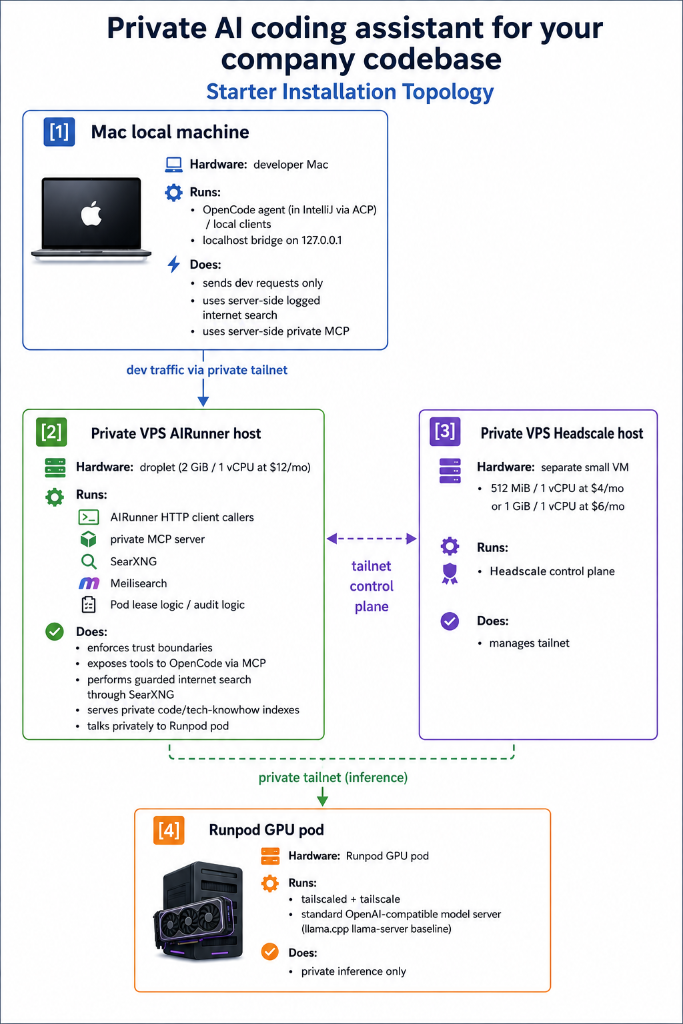
A private AI coding assistant has five components:
Developer laptop
→ local coding assistant (e.g., OpenCode via ACP in IntelliJ)
→ local bridge (OpenAI-compatible Go client on localhost)
→ private mesh network (“VPN on Steroids” Headscale/Tailscale)
→ customer-controlled AI gateway (on your private VPN server)
→ GPU server or rented GPU pod
→ open-source coding model (e.g., Qwen 3.6 27B)
Plus private search indexes:
- Proprietary source-code search
- Confidential company documentation search
- Technical-library documentation search
- Redacted web search
All running on open-source software inside your private Tailscale network, available via MCP to your coding agent.
Let’s break down each component.
Component 1: The local coding assistant
Your developers need a tool on their laptop that can interact with the AI model. Options include:
- OpenCode (via ACP in IntelliJ, or standalone)
- Continue.dev (VS Code extension or for IntelliJ)
- Any OpenAI-compatible client pointed at your local bridge
The key requirement: the client must support custom API endpoints. You point it at localhost:8080 (or whatever port your local bridge uses), not at api.openai.com.
What you need:
- Install the coding assistant on each developer laptop
- Configure it to point at the local bridge
- Ensure developers understand they are using a private model, not ChatGPT
Where it gets tricky: Some assistants hardcode OpenAI endpoints or add friction when using custom endpoints. OpenCode and Continue.dev both support custom endpoints cleanly.
Component 2: The local bridge
The local bridge is a lightweight HTTP server running on the developer’s laptop. It receives requests from the coding assistant and forwards them through the private network to the AI gateway.
Why not connect directly to the GPU server? Two reasons:
- Network isolation: The GPU server should not be directly accessible from developer laptops. The bridge routes traffic through the private mesh.
- Request shaping: The bridge can add context, handle retries, and manage connection pooling.
A Go-based OpenAI-compatible bridge works well. It exposes localhost:8080/v1/chat/completions (or similar) and forwards requests to the AI gateway’s private Tailscale IP.
What you need:
- A bridge binary for each developer platform (macOS, Linux, Windows)
- Configuration pointing at the AI gateway’s Tailscale IP
- Basic authentication or API key validation
Where it gets tricky: The bridge must handle streaming responses correctly. If the bridge buffers the entire response before sending it to the client, the developer experience is poor (long waits with no visible progress). Proper streaming support requires careful HTTP handling.
Component 3: The private mesh network
This is the component that makes the setup private. Instead of sending requests over the public internet to an OpenAI endpoint, requests travel through a private mesh VPN.
Tailscale (managed) or Headscale (self-hosted) both work. They create a private network with private IP addresses. Devices on the network can communicate with each other. Devices not on the network cannot see the traffic.
Architecture choice:
| Option | Pros | Cons |
|---|---|---|
| Tailscale (managed) | Easier setup, stable, well-documented | Data plane goes through Tailscale’s coordination server (encrypted, but some teams prefer full self-hosting) |
| Headscale (self-hosted) | Full control, no third-party coordination server | More setup work, you manage the control plane |
For most teams, Tailscale is fine. For teams with strict self-hosting requirements, Headscale is the answer.
What you need:
- A Tailscale account (free for small teams) or a Headscale server
- Install Tailscale/Headscale client on each developer laptop
- Install Tailscale/Headscale on the AI gateway server
- Install Tailscale/Headscale on the GPU server
- Configure ACLs so developer laptops can reach the AI gateway but not the GPU server directly
Where it gets tricky: ACL configuration. You want developers to reach the AI gateway, the AI gateway to reach the GPU server, but developers should not reach the GPU server directly. Getting the ACL rules right requires understanding Tailscale’s policy syntax.
Component 4: The AI gateway
The AI gateway is a server (typically a small VPS) that sits between the developer laptops and the GPU server. It handles:
- Request routing: Forward requests to the GPU server running the model
- Private MCP server: Exposes tools to the coding assistant (code search, documentation search, web search)
- SearXNG: Guarded internet search through a controlled path
- Meilisearch: Private code and documentation indexes
- Pod lease logic: Start/stop GPU pods on demand to save costs when not in use
- Audit logging: Track usage patterns without logging code content
A small VPS (2 GiB RAM, 1 vCPU, around $12/month) is sufficient for the gateway. It does not run the model — it routes requests and serves indexes.
What you need:
- A VPS running Linux
- Tailscale/Headscale installed and connected to the private network
- Docker or similar for running MCP, SearXNG, Meilisearch
- Configuration for routing requests to the GPU server’s Tailscale IP
Where it gets tricky: The gateway is the orchestration layer. Getting MCP, search, indexing, and model routing to work together requires integration work. Each piece is simple. Making them all work as a coherent system takes time.
Component 5: The GPU server and model
This is where the actual AI inference happens. Options:
| Option | Pros | Cons |
|---|---|---|
| Rented GPU pod (RunPod, etc.) | No hardware investment, scale up/down, start/stop on demand | Recurring cost, not “your” hardware, but in secure cloud |
| Your own GPU server | Full control, no recurring GPU cost (except electricity) | Upfront hardware cost, driver/CUDA/maintenance complexity |
Model selection:
Qwen 3.6 27B is a strong private-coding candidate. It requires:
- GPU: NVIDIA RTX 4090 (24 GB VRAM) or equivalent for comfortable inference
- VRAM: 16 GB minimum, 24 GB recommended for full context length
- Inference server: llama.cpp’s llama-server or vLLM for OpenAI-compatible serving
What you need:
- GPU server with sufficient VRAM
- CUDA drivers installed and working
- llama.cpp or vLLM compiled and configured
- Model weights downloaded (available from HuggingFace)
- Tailscale/Headscale installed and connected to the private network
- OpenAI-compatible API endpoint exposed on the private network
Where it gets tricky: This is where most DIY attempts stall.
- CUDA version compatibility: The model, the inference server, and the GPU drivers must all agree on CUDA versions. They frequently do not.
- Driver issues: NVIDIA drivers on Linux are notoriously finicky. A kernel update can break CUDA. A CUDA update can break the driver.
- Memory management: Large models need careful memory allocation. OOM errors are common on first setup.
- Quantization choices: Running a model in full precision (FP16) requires more VRAM than quantized versions (Q4_K_M, Q8_0). Choosing the right quantization affects quality and speed.
- Context length: Longer context windows require more VRAM. Configuring context length for your GPU size requires calculation.
Component 6: Private codebase indexing (RAG)
Large language models are not trained on your private source code. They are weak on your internal architecture, proprietary libraries, and niche frameworks.
The solution: private retrieval-augmented generation (RAG). You index your codebase and documentation. When the assistant needs context, it searches the index first, then sends relevant snippets to the model.
What you need:
- Meilisearch or similar search engine running on the AI gateway
- Indexing pipeline for your repositories (clone, parse, chunk, index)
- Indexing pipeline for your documentation (markdown, HTML, PDF)
- MCP server exposing search tools to the coding assistant
- Separation between customer code indexes and public/technical doc indexes
Where it gets tricky:
- Chunking strategy: How do you split code into searchable chunks? Too large and the model gets irrelevant context. Too small and you lose structural information.
- Index updates: Code changes. The index needs to stay current. Automated re-indexing on push is ideal but requires CI integration.
- Scope boundaries: Which repositories get indexed? Which branches? How do you handle monorepos with multiple projects?
The full setup checklist
If you are building this yourself, here is what you need to do:
- Set up Tailscale/Headscale network — install clients, configure ACLs
- Provision AI gateway VPS — install Docker, build the gateway, Tailscale, configure routing
- Provision GPU server — install CUDA, drivers, Tailscale
- Download and configure model — choose model, download weights, configure llama.cpp/vLLM
- Build local bridge — compile or download bridge binary, configure for each platform
- Install coding assistant — configure OpenCode/Continue.dev on developer laptops
- Set up codebase indexing — clone repos, build index, configure Meilisearch
- Set up documentation indexing — parse docs, build index
- Configure MCP server — expose search tools to coding assistant
- Set up SearXNG — configure guarded web search
- Test end-to-end — verify developer can query private codebase through assistant
- Document the setup — write operating notes for your team
- Handle edge cases — streaming, timeouts, error handling, reconnection
Estimated time for someone who has done it before: 2–3 days.
Estimated time for someone doing it the first time: 4-8 weeks, assuming no major CUDA/driver issues.
Where it gets complicated enough to hire help
Each individual component is well-documented. The complexity is in the integration:
- CUDA/driver compatibility is the most common failure point. A version mismatch between your GPU driver, CUDA toolkit, and inference server can waste days.
- Building the gateway that integrates indexes, redacted web search and secure communication between laptop and GPU requires proper software engineering
- Network configuration requires understanding Tailscale ACLs, private IP routing, and firewall rules.
- MCP integration is new. Documentation is sparse. Getting the coding assistant to properly use private search tools requires trial and error.
- Streaming support must work end-to-end: from the model, through the gateway, through the bridge, to the client. A bug in any layer breaks the developer experience.
- Codebase indexing requires decisions about chunking, scope, updates, and separation that affect quality.
If you have a platform engineer with GPU experience and two months to spare, build it yourself. The components are all open-source.
If you want a working setup in 5–7 days without the integration pain, that is what we do.
What a starter installation includes
Private AI Coding Assistant Starter Installation — from EUR 2,000
- One bounded codebase
- Private model route through customer-controlled infrastructure
- One private codebase and one documentation index
- Local developer assistant with private network connection
- Redacted web-search path
- Developer handover session and operating notes
What you provide:
- A technical contact
- Repository boundary
- Two VPS (Headscale, AI gateway) or we guide you through provisioning
- Read-only access or sanitized repository bundle or you upload it later yourself
- Infrastructure decision: customer server or customer-controlled GPU pod
- Allowed model budget and usage expectations
What is not included:
- Production database access
- Secret ingestion
- Enterprise SSO
- Guaranteed replacement for Claude/GPT in every task
- Unlimited model benchmarking
- Full managed operations, security and indexes update unless a support plan from 100 EUR per month is added
Timeline: 5–7 working days after access is confirmed.
The incentive argument (why this setup is structurally private)
The technical architecture matters. But the reason this setup is private is not just technical. It is economic.
- Closed-source AI providers (ChatGPT, Claude, Gemini, Grok) have every incentive to log your traffic. Your code trains their next model. That is their business model.
- GPU hosting providers have no incentive to log your traffic. They sell compute by the hour. They have no proprietary model to train. Your code is not their product.
- Open-source models are already public. Nobody is extracting proprietary training data from your usage because the model weights are freely available.
This is incentive alignment. The GPU provider makes money from compute. The model is open. Your code stays yours.
The first step
If you want to build this yourself, this article gives you the architecture. Expect 2 months of integration work, with CUDA/driver issues as the most common blocker.
If you want a working private AI coding assistant in 5–7 days, the next step is a 20-minute fit call.
We check your code privacy constraints, current developer workflow, preferred infrastructure path, and whether a starter installation is realistic for your codebase.